
Whoop Triggerz Plus
The C-Dub BrandMusic & Audio
4.7385.00 Reviews
- Version
- 2.1.46
- Installs
- 100.00K
- Age Rating
- Everyone
Screenshots
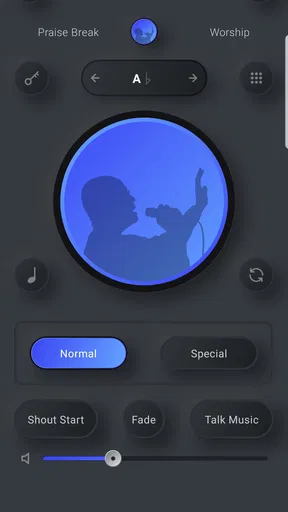
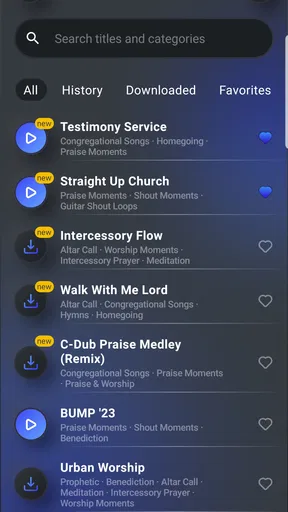
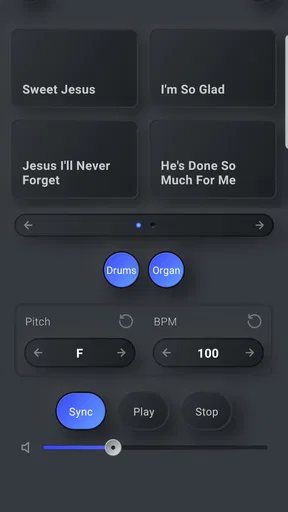
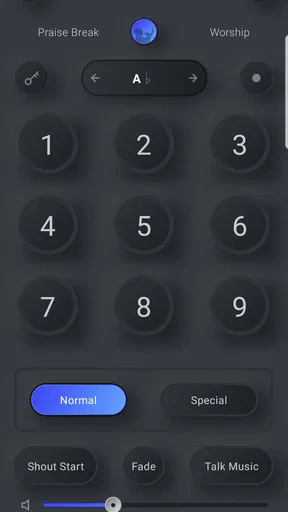
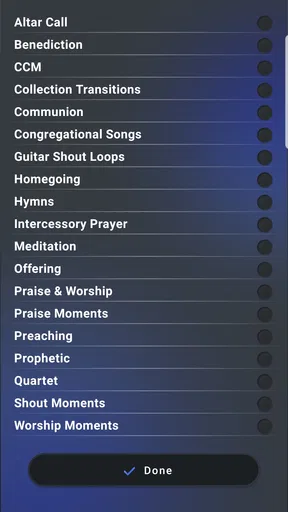
Our Review of Whoop Triggerz Plus
 Analysis by Appyee
For a church musician preparing for a service, the tricky part is rarely finding a sound in isolation; it is getting the whole setup ready without creating a distraction during the performance. That is the practical problem Whoop Triggerz Plus is meant to help with. I’d think of it as a music-and-audio tool for adding triggered sounds to a live set, rather than a replacement for a keyboard player, a full backing-band arrangement, or a general music player.
Where setup and performance can get stuck
A sound app can feel simple in a quiet room and much less simple when people are waiting for the next song. The main friction to plan for here is not just learning the controls: it is deciding in advance which sounds belong in a set, how they should sit alongside the musicians, and who will handle them while the group is playing. If nobody has time to prepare that role, adding an app may create one more thing to manage rather than making the performance easier.
I would start with a short rehearsal instead of loading a large selection and trying to make decisions on stage. Choose only the sounds you expect to use, test their levels with the instruments and vocals, and agree on who will trigger them. This gives the person operating the phone a clear job and lets the rest of the group listen for whether the sounds support the song or compete with it.
Simple checks before taking it live
Before a service or gig, I’d check that the app is installed, the intended sounds are available, and the device is ready for the session. Then I’d rehearse the handoffs: which sound comes in, when it should stop, and what the operator should do if the group changes the arrangement. Those are practical checks, not guarantees about how the app behaves on every device or in every room.
It also helps to avoid changing several things at once. If a sound seems too prominent, adjust one part of the setup, listen again, and keep notes for the next rehearsal. A phone can make quick edits convenient, but quick edits made under pressure can also leave the operator unsure which version is active. A small, familiar set of choices is often more useful than an ambitious collection that nobody has practiced.
Recovering smoothly when a sound misses its cue
Live music rarely follows a perfect script. A singer may repeat a line, a drummer may extend a transition, or the group may decide to skip a planned section. For that reason, I would treat any prepared playback as support, not as the conductor of the whole performance. The musicians should be able to carry on if a cue is missed, and the operator should know when to leave a sound out rather than forcing it into a changed arrangement.
If something does not play as expected, pause before making several rushed adjustments. Check the selected sound and the current controls, then try the sequence again during rehearsal. If the issue continues, simplify the setup and use fewer cues for that session. That kind of fallback is more dependable than relying on an untested change while the band is already playing.
When the phone may not be the problem
A sound that feels wrong in a room is not automatically an app problem. The arrangement, the musician’s timing, the room’s acoustics, and the way the sounds balance with the rest of the group can all affect the result. I would listen from more than one place if possible and ask whether the sound is serving the song before assuming that a new setting will fix it.
The same goes for a performance that feels cluttered. Extra layers can add energy, but they can also crowd a vocal or make a simple passage feel busy. In my view, restraint is part of using a trigger app well: leave space where the music needs it, and use a sound because it supports a musical moment, not simply because it is available.
What is Whoop Triggerz Plus?
For those who aren’t familiar, Whoop Triggerz Plus is an app available on both Android and iOS that’s designed to enhance live music performances. It’s primarily aimed at musicians who want to add a little extra flavor to their gigs. Whether you’re in a church band or performing at a local venue, this app gives you the tools to create impressive soundscapes.
Setting Up Your Musical Playground
Getting started with Whoop Triggerz Plus is a breeze. Once you download it, you’ll be greeted with a clean interface. I really appreciated how intuitive it is, even if you’re not super tech-savvy. You can easily navigate through the menus and find what you need without feeling overwhelmed.
The app offers a variety of sound packs that cater to different genres and styles. From gospel to R&B, you’re sure to find something that suits your vibe. Simply download the packs you like, and they’re ready to use. It’s like having a library of sounds right at your fingertips!
Features That Hit the Right Notes
One of the standout features is the auto-pilot mode. This allows you to set up your soundtracks in advance and have them play without needing to manually trigger each sound. It’s perfect for those times when you want to focus on your performance rather than worrying about hitting the right button at the right time.
Another cool aspect is the ability to customize your tracks. You can layer different sounds, adjust volumes, and even add effects. This level of customization means you can really make your performances unique and tailored to your audience.
Perform Like a Pro
Using the app during a live performance is where it truly shines. The app is reliable, and I didn’t encounter any lag or glitches, which is crucial when you’re on stage. The response time is quick, ensuring that your live sound transitions smoothly just like a pro setup.
The user interface during a performance is straightforward, with large buttons that are easy to tap, even in the heat of the moment. You can focus on your music without worrying about technical hiccups.
Why You Might Love It
If you’re passionate about music and love experimenting with sounds, this app is a game-changer. It’s versatile, allowing you to switch up your style and keep your performances fresh. Plus, the sound quality is top-notch, so your audience will be getting a professional experience.
For those who are part of a worship team, the app’s extensive library of gospel sounds makes it a fantastic tool. You can easily create a dynamic worship session that flows seamlessly.
A Few Things to Keep in Mind
While Whoop Triggerz Plus is packed with features, it does come with a bit of a learning curve, especially if you want to dive deep into customization. But once you get the hang of it, the possibilities are endless.
Also, some of the sound packs are available through in-app purchases, so if you’re looking to expand your collection, be prepared to invest a little extra. The app itself is free, and the available in-app purchases range from $24.99 to $239.99 per item, so I’d decide what you actually need before buying anything. That range makes trying one sound pack and building a larger library very different spending decisions.
How it fits into an everyday music routine
A realistic use case is a worship team that rehearses once before a weekend service. One person can prepare a modest set of cues for the songs, while the musicians keep their attention on the arrangement and each other. During rehearsal, the group can decide which transitions genuinely benefit from an added sound and remove the rest. That keeps the app useful without turning every pause or chorus into an effect.
For a small local venue, it may also help a singer or instrumentalist add texture when the group has no dedicated keyboard player. It is best understood as a way to supplement what the performers are already doing. If you need someone to respond musically in real time, vary chords, or follow spontaneous changes, a live musician remains more flexible than a prepared sound or trigger.
Who should choose it—and who should look elsewhere
I can see this being a good fit for church musicians, small performance groups, and players who already know the moments where extra sounds would help. It is especially appealing if a team can assign one person to prepare and operate the cues, rather than expecting every musician to monitor a phone while playing. The developer is The C-Dub Brand, and the app sits squarely in the music and audio space rather than trying to be a broad recording studio.
If your main goal is to listen to albums, record a polished multitrack production, or build arrangements from scratch, I would use a music player, recording tool, or full production setup instead. Those alternatives are built for different jobs. Likewise, if your group changes its structure constantly and depends on spontaneous musical responses, a prepared trigger workflow may feel restrictive rather than helpful.
Choosing a workflow that stays dependable
One useful trade-off is between convenience and control. Auto-pilot can reduce the need to tap every cue, but a prearranged sequence is naturally less adaptable when the performance departs from the plan. Manual triggering gives the operator more discretion, though it asks for attention at exactly the moments when the music may be busy. I would choose the method song by song, and avoid assuming one approach suits an entire set.
Another practical tip is to make the first live run deliberately conservative. Use only a few cues, keep the musicians’ existing arrangement intact, and ask afterward whether each sound improved the moment. If the answer is unclear, remove it rather than adding more layers. This gives the group a way to judge the app by musical usefulness, not by how many sounds it can involve.
It is also worth agreeing on a fallback before the performance begins. If a cue is late or the song changes, the band can continue without waiting for the phone. That small decision reduces pressure on the operator and prevents a technical tool from becoming the center of attention. For a group that values flexible, live interaction, that fallback is not a sign of failure; it is sensible stage preparation.
Compatibility, cost, and expectations
The app is free to install and is rated for Everyone; it was released on June 3, 2019, and version 2.1.29 requires Android 8.0 or later. Its average rating is 4.6 from 942 ratings, with 377 written reviews and more than 50,000 installs. Those figures suggest a real audience for the app, but they do not tell me whether its workflow will suit a particular band. I would judge that through a rehearsal with the actual people and songs involved.
Before relying on it for a performance, check that your device meets the Android requirement if you use Android, and give yourself time to explore the interface and prepare the sounds. If you are on iOS, the app is also available there. Either way, I would not make a first attempt during a service or gig: a quiet practice run is the simplest way to learn where you need to tap and whether the chosen sounds fit the group.
Final Thoughts
All in all, Whoop Triggerz Plus is a powerful tool for any musician looking to elevate their live performances. It’s easy to use, packed with features, and offers a level of creativity that’s hard to beat. Whether you’re new to live sound apps or a seasoned pro, this app is definitely worth checking out.
So, if you’re ready to take your music to the next level, give Whoop Triggerz Plus a try. It might just be the missing piece you’ve been looking for.
Verdict
Strengths of Whoop Triggerz Plus
- User-friendly interface for quick setup.
- Extensive library of sound packs.
- Seamless integration with MIDI devices.
- Reliable performance during live events.
- Regular updates with new features.
Limitations of Whoop Triggerz Plus
- Limited free version features.
- Requires stable internet connection.
- Some sound packs are pricey.
- Learning curve for beginners.
- Occasional app crashes reported.
Other Releases by The C-Dub Brand
View All
Loops By CDUB
Music & Audio3.5
Similar Picks in This Category
View All
YouTube Music
Google LLC4.4

Samsung Music
Samsung Electronics Co., Ltd.3.8

Spotify: Music and Podcasts
Spotify AB4.3

JioSaavn - Music & Podcasts
Saavn Media Limited4.3

Lark Player:Music Player & MP3
Lark Player Studio - Music, MP3 & Video Player4.6

StarMaker: Sing Karaoke Songs
SKYWORK AI PTE. LTD.4.3
Frequently Asked Questions
What is Whoop Triggerz Plus and what are its main features?
Whoop Triggerz Plus is a dynamic music app designed for enhancing live worship experiences. It offers a range of features including a library of loops, tracks, and sound effects, all customizable to fit different worship settings. The app allows users to trigger sounds seamlessly during live performances, making it ideal for musicians and worship leaders.
Is Whoop Triggerz Plus available on both Android and iOS platforms?
Yes, Whoop Triggerz Plus is available for download on both Android and iOS devices. This cross-platform availability ensures that users can enjoy its features regardless of their device preference, making it accessible to a wide range of musicians and worship leaders.
Does Whoop Triggerz Plus require an internet connection to function?
While Whoop Triggerz Plus can be used offline after downloading the necessary loops and tracks, some features such as updates and additional content may require an internet connection. This allows users to access a broader range of resources and ensures the app stays current with new features.
Are there any subscription fees or in-app purchases associated with Whoop Triggerz Plus?
Whoop Triggerz Plus is a subscription-based app, requiring users to pay a monthly or annual fee to access its full suite of features. The subscription model supports ongoing development and ensures users receive regular updates and new content. Some additional loops and tracks may also be available as in-app purchases.
How user-friendly is Whoop Triggerz Plus for beginners?
Whoop Triggerz Plus is designed with an intuitive interface that makes it user-friendly for both beginners and experienced users. It includes tutorials and a straightforward navigation system, helping new users quickly learn how to integrate the app into their live performances effectively.
